For martial arts schools

The trust you build on the mat belongs beyond it.

Parents and adult students cannot feel your school’s atmosphere from a timetable. Help the people who train with you share an honest account of what it is like to belong.

$1,000 setup plus $900 for a standard 60-day campaign. Setup, sending and the first wave are done by us. Your customer’s own words, on your own domain.

Review Machine: how a review reaches your Google listing Your customer list leads to a personal link sent from your domain, then to the customer's own words and own rating, then to your Google listing; an unhappy customer can instead send private feedback to you. Your customer list A personal linkfrom your domain Their own words,their own rating Your Google listing Or private feedback to you Review Machine: how a review reaches your Google listing Your customer list leads to a personal link sent from your domain, then to the customer's own words and own rating, then to your Google listing; an unhappy customer can instead send private feedback to you. Your customer list A personal linkfrom your domain Their own words,their own rating Your Google listing Or private feedbackto you
The path every customer takes: your list, a personal link from your domain, their own words and rating, your Google listing. An unhappy customer can reach you privately instead.

A family is choosing more than a class.

Before booking a trial, a parent may be wondering how beginners are treated, whether instruction is clear, and whether their child will feel welcome. An adult student may be asking the same questions about themselves. Your website can explain your approach. Your community can describe its own experience.

Make the atmosphere easier to understand

Class names and belt systems explain what you teach. Real accounts can help a newcomer understand what attending feels like. Customers decide which details matter to them; they are never given a required list of things to praise.
Give every location its own voice

A strong reputation at the original school does not automatically tell a family what the newer location is like. Start with one listing and its own eligible audience, then use the same operating process elsewhere.

Make asking a habit your team can sustain

An instructor should not need to remember a sales pitch at the end of every class. Agree a member cohort, a message, and an owner for the workflow. The system handles the invitation path; your staff keep the data and permissions current.

“We should ask our members” is easy to postpone.

The school is busy, the front desk is covering another job, and the member who meant to write something has gone home. A generic Google link still leaves them with a blank box. A personal invitation and a starting draft built from the facts of their own training reduce the work of getting started. They rewrite or replace it before publishing from their own account, so the opinion stays theirs.

When this becomes worth doing.

A useful campaign starts with a real audience and a specific operational problem. These are situations to explore, not a promise that every business needs a campaign.

Your school has an established community

Use a relevant cohort of real members who have had enough experience to comment. Do not select only your most enthusiastic families.

A new location looks less established online

Build a separate baseline and audience for that location. Do not copy another branch’s results into its proof.

You want a process that survives staff changes

Train one operator, document the next eligible cohort, and keep the workflow out of an instructor’s personal inbox.

From the records you have to a request that makes sense.

We configure and launch the workflow. Your customer controls the review.

Review Machine: how the campaign works We prepare and deduplicate your list, send the invitation from your name and domain, the customer rewrites the draft and posts it from their own account, and you watch it on the dashboard and get a dated final report; an unhappy customer can send private feedback instead. We prepare anddeduplicate your list We send theinvitation from yourname and domain The customer rewritesthe draft and posts itfrom their own account You watch it on thedashboard and get adated final report Or private feedbackto you Review Machine: how the campaign works We prepare and deduplicate your list, send the invitation from your name and domain, the customer rewrites the draft and posts it from their own account, and you watch it on the dashboard and get a dated final report; an unhappy customer can send private feedback instead. We prepare and deduplicateyour list We send the invitation fromyour name and domain The customer rewrites thedraft and posts it fromtheir own account You watch it on thedashboard and get a datedfinal report Or private feedbackto you
Who does what at each stage: we prepare the list and send, the customer writes and posts from their own account, and you follow the results.

Agree a fair member cohort

Select by a neutral rule, such as an appropriate enrollment period. Contact adult students or the authorized parent/guardian, not children. Exclude opt-outs and duplicates.

Make the invitation recognizable

Use your school’s brand, domain, and approved sending identity. Keep the request voluntary and do not tie it to belt progression, access, or a reward.

Let the member take over

The recipient gets a starting draft built from the facts of their own training, and rewrites or replaces it with their own words. They choose their rating on Google and decide whether to publish from their own account.

Hand the process to your team

We launch the first wave, explain the activity report, and train your operator to work with the next eligible group. New integrations are a separate scope.

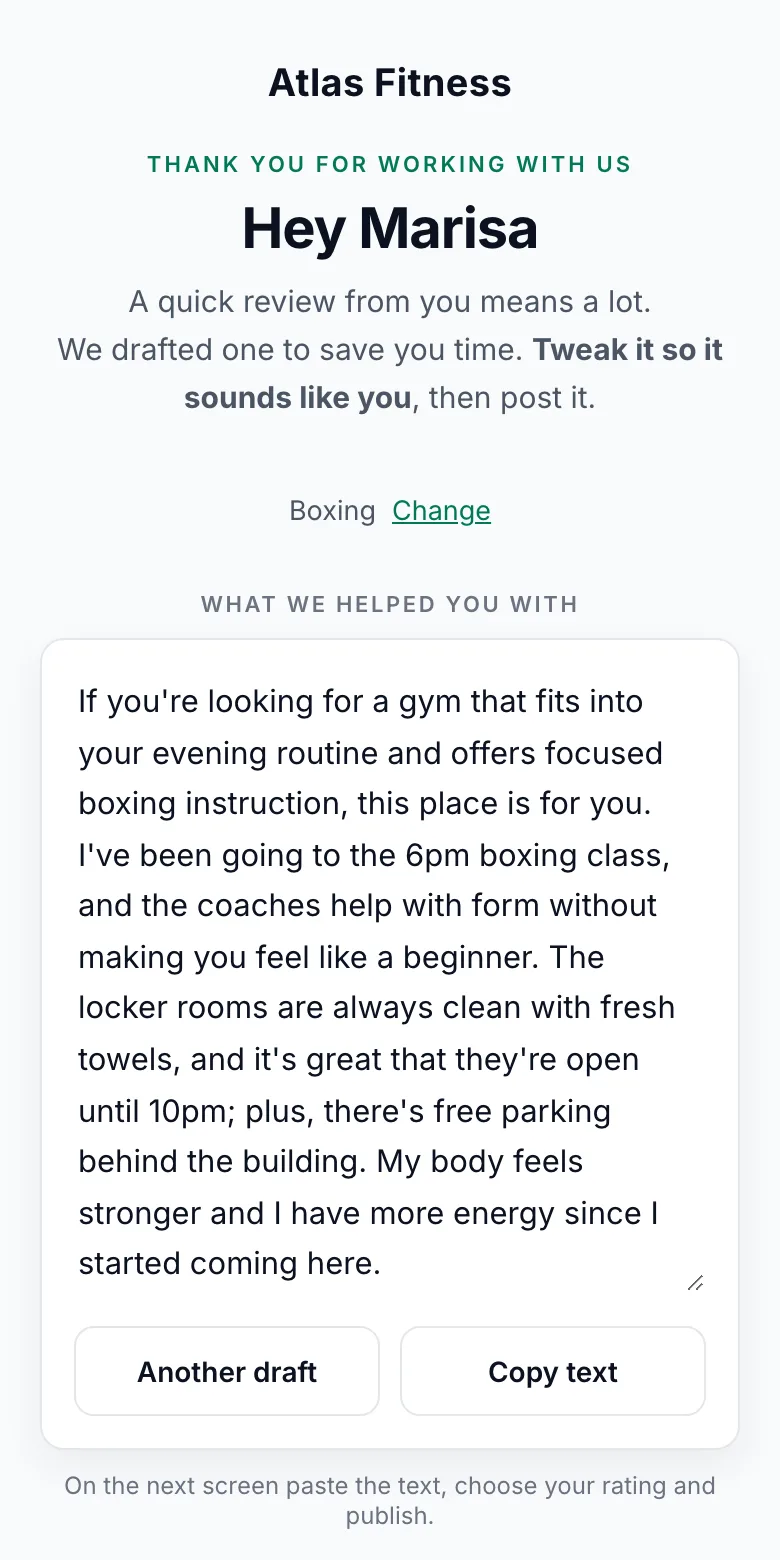
A Review Machine customer page on a phone, showing an editable starting draft with the buttons Another draft and Copy text.
The screen the customer opens: a starting draft built from the facts of their own visit. They rewrite or replace it, choose the rating and post it from their own account.

What the customer sees

The draft is a starting point built from the facts of the customer’s own visit, not a submission. The customer rewrites it, asks for another wording, or replaces it entirely before publishing from their own account. Nothing is posted from this page, and the rating is chosen on the review site under the customer’s own account.

The member’s experience stays theirs.

No incentives for posting, no requested star rating, and no selection based on who is likely to be positive. Avoid putting children’s names, personal difficulties, or sensitive family information into invitations or draft context. A private feedback path is a setting you control: you decide whether it is on and whether an unhappy customer also sees the public review link. A thank-you after posting is optional and your decision. We walk you through the trade-offs and Google’s review policy before launch.

The standard launch starts with one usable export. It does not assume a new CRM integration or a fully automatic service trigger.

A real martial arts example. With the limits left in.

The published KD MMA case covers three Los Angeles-area locations. Its Google listings showed 63 reviews on August 4 and 187 on September 17, 2026. That is an observed increase of 124 during the period, not 124 individually attributed campaign results.

We had wanted to find out how our members really feel about the brand for a long time. We did not expect this much response. Automating the invitations made the difference: our staff did nothing extra, and members wrote in their own words.

KD MMA, three locations in the Los Angeles area

Read the published product story →

63 to 187

Combined listing counts, 4 August to 17 September 2026.

  • Glendale38 to 99
  • Montrose22 to 62
  • Northridge3 to 26

The same campaign in 67 seconds

Northridge had over a hundred members on file and 3 reviews on its Google listing, the newest six months old. The film says five weeks: invitations went out on weekdays from 5 August to 9 September 2026, and the counts were taken on 4 August and 17 September.

These are the counts the listings gained, not reviews we produced.

Watch on YouTube →

Check my Google listing →

See the journey. Keep the measurements separate.

A dashboard should help you decide what to do next. It should not turn a click into a published review or a change in the listing into a promise about revenue.

Invitations

Who entered the campaign and which sends succeeded or failed.

On-page activity

Customer-page engagement, copying, and clicks to the review platform.

Self-reported posts

What customers tell us they posted. This is not verified publication.

Listing changes

Dated public counts and ratings. For the managed campaign, this dated public count is what the final report shows. Organic activity can affect it too.

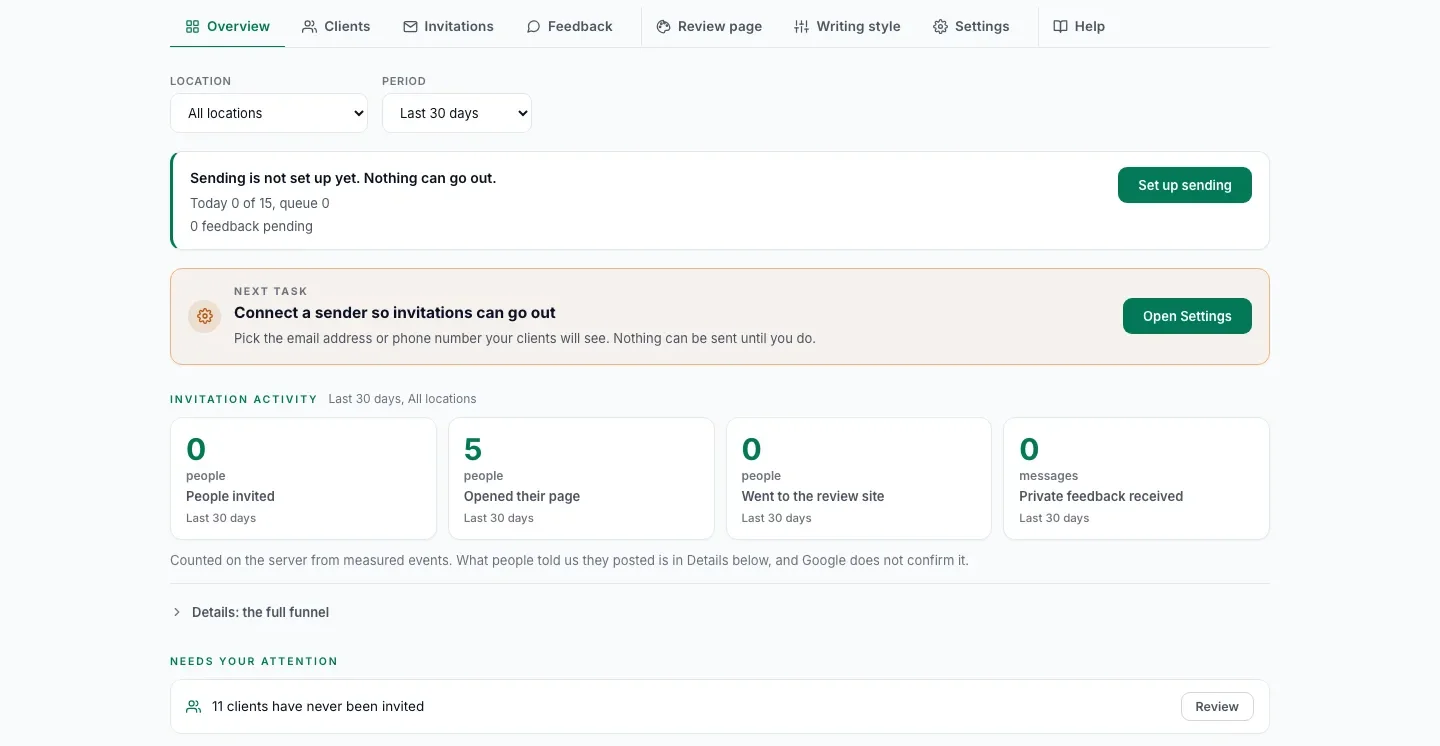
The Review Machine Overview on a demo account, showing the counters for people invited, pages opened, visits to the review site and private feedback received.
The dashboard the client watches: who was invited, who opened their page, who went on to Google, and private feedback received.

How we count every invitation

Each customer on your list has one invitation status, with the same words for email, SMS and WhatsApp. A status your staff set by hand is labelled as a staff mark.

Not invitedNo invitation has gone out yet.
ScheduledIt goes out on its own at a set time. Nothing to do.
Ready to sendWaiting for your staff to send it by hand from their own WhatsApp or phone.
SentThe message went out, as the provider reports or your staff mark it.
DeliveredThe phone received it, as the SMS or WhatsApp provider reports or your staff mark it when they see it delivered, such as two grey ticks in WhatsApp. Emails stay at Sent.
FailedIt did not go out, or it bounced, as the provider reports or your staff mark it with a reason, such as a wrong number or a number not on WhatsApp.
CancelledIt is not going to be sent.

Progress then follows each customer from opening their page to writing a draft, copying it, clicking through to Google and saying they posted, and that last step is their own word, because Google does not tell anyone who published.

Review counts, ratings, rankings and new customers are not guaranteed. Google controls publication and moderation. A rise in the public count can be observed during a campaign without proving the campaign caused it.

The standard campaign, and what it costs

The standard campaign is one brand, one Google location, the customers you already served with no cap per location, one English email campaign, and 60 days.

The standard campaign
Duration 60 days from launch
Scope One brand, one Google location
List The customers you already served and may contact. No cap per location
Channel Email in English
Destination Google
Included List preparation, sender and domain setup, invitation copy, first wave launched by us, monitoring, final report
You provide The list, DNS and Google Business Profile access, message approval, someone to answer private feedback
Extra locations $900 each in the same campaign
Quoted separately Languages, WhatsApp or SMS, integrations, custom data work

Non-standard requirements such as integrations, additional languages or custom data work are quoted separately and can raise the price substantially.

We run the campaign for you

Managed Campaign

$1,000 setup plus $900 for a standard 60-day campaign

A defined campaign at a fixed price, with no guaranteed review volume and no automatic renewal.

  • One brand, one Google location, no cap on customers
  • One English email campaign, run by us for 60 days
  • Standard campaign email and model costs included
  • A fixed price that does not depend on the number of reviews
  • Final report with the public review count on launch day and on day 60, from dated screenshots
  • Each extra location in the same campaign: $900
  • Afterwards, if you want it: we keep inviting your new customers for $299 per location per month
  • 5 or more locations: $249 per location per month after the campaign
Check whether your list is a fit

Run it yourself

Self-Run Plan

$1,000 setup plus $179 per location per month

We set it up, launch the first wave and train your team. Your team sends the next waves from the dashboard.

  • Your branding, subdomain, and one sending identity
  • One usable import, no cap on customers per location
  • Approved email copy and a first wave launched by us
  • Activity dashboard and a 45-minute staff handoff
  • Hosting, sending and drafts included for the standard scope
  • Month to month, per location
Check whether your list is a fit

Pay yearly and save 15% on monthly fees. There is no cap on customers per location. More than 5 locations and more than 3,000 customers: we plan the project with you on a call.

What you pay for

The setup is yours to keep in either option: your domain, your sending, your list prepared, and the first wave launched. It is paid once and is not credited against other fees. The campaign fee is fixed and does not depend on the number of reviews. There is no automatic renewal.

The setup includes a review audit of your Google listing: a dated report of where it stands before the first invitation. See a sample report.

What counts as a result

The final report compares the listing’s public review count on the launch date and on day 60, both counts recorded with dated screenshots. It shows what the listing gained over the period, not a claim that each review was caused by the campaign, and the price does not depend on it. Clicks, copied text and self-reported posts are reported separately and never presented as published reviews.

What the monthly plans include

After the campaign, we can keep inviting your new customers for $299 per location per month, with a monthly report, or $249 with 5 or more locations. On the Self-Run Plan, $179 per location per month covers hosting, sending and drafts for the standard scope, and your team runs the waves. Both are month to month. Source code is not included.

Review Machine: how the campaign result is reported Example: the Google listing shows 41 reviews on launch day and 78 on day 60, both recorded with dated screenshots; the final report shows the net increase of 37. The price is fixed and does not depend on this number. Launch day example 41 reviews dated screenshot Day 60 example 78 reviews dated screenshot net increase 37 Final report: +37 on the listing, from dated screenshots The price is fixed and does not depend on this number. Review Machine: how the campaign result is reported Example: the Google listing shows 41 reviews on launch day and 78 on day 60, both recorded with dated screenshots; the final report shows the net increase of 37. The price is fixed and does not depend on this number. Launch day example 41 reviews dated screenshot net increase 37 Day 60 example 78 reviews dated screenshot Final report: +37 on the listing,from dated screenshots The price is fixed and does notdepend on this number.
How the result is reported: the public count on launch day and on day 60, both from dated screenshots. The price does not depend on it. The numbers are an example.

Prices in USD, taxes additional. Offer details are confirmed in the order.

Check my listing and get a plan →

A useful fit check

Worth saying plainly, because the wrong starting point wastes a campaign for both of us.

A good starting point

  • You have a real member community and permission to contact it.
  • One location has a Google listing worth improving.
  • An owner can approve copy and name an ongoing operator.

We should pause if

  • You need a guaranteed five-star count or rank.
  • You want to contact minors directly or reward families for posting.
  • Nobody can maintain the list or act on feedback.

Good questions. Clear answers.

Start with the actual workflow and scope, not an assumed result.

Can we ask parents rather than children?
Yes, use an appropriately authorized adult contact and invite their own genuine experience. Do not import children’s personal information just to personalize a review request.
Should we invite only long-time, happy members?
Choose a neutral eligibility rule based on sufficient experience, not predicted satisfaction. Being unhappy must not remove someone’s opportunity to give public feedback.
Can each school have its own campaign?
Yes, additional locations are separately scoped. Start with one location so the audience, operator, costs, and reporting are clear.
Will this bring more trial students?
It is intended to make real member experiences easier to discover. We do not guarantee trial bookings or infer additional enrollments from review counts. Measure those business outcomes separately.
What is the role of AI?
It builds a starting draft from the approved facts of the customer’s own visit. It must not invent an experience or tell the customer what to think. The customer rewrites or replaces the draft before publishing, chooses a rating, and publishes from their own account. This is not automatic posting.
What if someone is unhappy?
Honest feedback includes criticism. A private feedback path is a setting you control: you decide whether it is on and whether an unhappy customer also sees the public review link. A thank-you after posting is optional and your decision. We walk you through the trade-offs and Google’s review policy before launch. We never ask for a star rating, and we do not choose recipients based on expected positive sentiment.
When can the standard launch be ready?
The proposed launch commitment is 10 business days after complete inputs and approvals. Client delays pause that clock. The order defines acceptance and the setup-payment refund if Fractalic cannot deliver the agreed launch; review results are not the acceptance condition.
How does the managed campaign end?
Invitations run through day 45. On day 60 we record the listing’s public review count with a dated screenshot and compare it with the count recorded on the launch date. The difference goes into the final report by day 67. It is not a claim that each review was caused by the campaign, and the price does not depend on it. There is no automatic renewal: you can stop, keep the invitations going on a monthly plan, or run it yourself. You can export your data until managed access ends on day 90.
Which languages can the invitation use?
English, Spanish and Arabic, and the page renders right to left in Arabic. Each standard installation covers one English email campaign; additional languages are quoted separately.
A practical next step

Check whether your list is a fit

Bring one Google listing and a rough count of adult students and parents you may contact. On a 30-minute call we say whether the standard campaign fits and record the starting count with you.

Check whether your list is a fit

Prefer email to a call? Check your Google listing and ask for a plan.

Calendar not opening? Open it in a new tab or write to we@fractalic.studio.

An initial conversation, not a commitment to buy. Please do not send customer lists or sensitive records.

Further reading: Google’s guidance on requesting honest reviews. Published Review Machine case and product context. Scope and requirements are confirmed for your business before purchase.

All six industries